



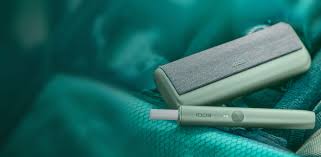
IQOS ILUMA PRIME is a next-generation heat-not-burn tobacco device designed to elevate your smoking experience with enhanced technology, stylish aesthetics, and user-friendly features. If you’re new to IQOS or just unboxing your ILUMA PRIME for the first time, this guide will walk you through everything you need to know about using it correctly and getting the most out of your experience.
How to Use Your IQOS ILUMA PRIME
Unboxing Your IQOS ILUMA PRIME
Inside the box, you’ll typically find:
-
1x IQOS ILUMA PRIME Holder
-
1x IQOS ILUMA PRIME Pocket Charger
-
1x USB-C charging cable
-
1x Power adapter
-
User manual
The ILUMA PRIME stands out from other IQOS models due to its premium materials, magnetic cover design, and most notably, the Smartcore Induction System™—which means there’s no blade and no cleaning required.
Step 1: Charge Your Device
Before you use your ILUMA PRIME, it’s essential to fully charge both the holder and the pocket charger.
-
Connect the device to the power adapter using the USB-C cable provided.
-
Plug into a power source.
-
Allow at least 90 minutes for a full charge (the light will indicate the charging status).
-
When the lights stop blinking, your device is fully charged and ready to use.
The holder should also be docked into the pocket charger to charge in between uses.
Step 2: Understand the Technology – Smartcore Induction System™
The IQOS ILUMA PRIME introduces a revolutionary heating method. Instead of using a blade to heat tobacco, it uses induction heating, activated by a metal element embedded inside specially designed TEREA™ sticks. This innovation eliminates the need for blade cleaning and provides a smoother, more consistent tobacco experience.
Important: Do not use regular HEETS with IQOS ILUMA PRIME. Only TEREA sticks are compatible. Using non-compatible sticks can damage the device.
Step 3: Insert the TEREA Stick
Using the device is simple:
-
Remove the holder from the pocket charger.
-
Take a TEREA stick and insert it into the top of the holder.
-
The stick should fit perfectly – no twisting or force needed. A small click will confirm it’s in place.
The ILUMA PRIME automatically detects the stick and prepares the device for heating.
Step 4: Activate the Device
Once the stick is inserted:
-
Press and hold the button on the holder for about 1 second.
-
The light will blink, indicating that the device is heating.
-
Within a few seconds, the light will turn solid – signaling that it’s ready to use.
The device provides approximately 6 minutes or 14 puffs, whichever comes first.
Step 5: During the Session
-
The LED light will gently pulse when you’re reaching the end of your session.
-
A final vibration and light indicator will let you know when your session is over.
-
Simply remove the used TEREA stick and dispose of it safely.
Because there’s no blade, you don’t need to worry about breaking anything during removal, making the process safer and cleaner.
Step 6: Recharge the Holder
After a session, reinsert the holder into the pocket charger. It will automatically begin recharging.
-
The charger holds up to 2 full uses per charge.
-
It takes around 5 minutes to fully recharge the holder for another session.
To check the charging status, just tap the side button on the pocket charger to see the LED indicators.
Step 7: Maintenance & Cleaning
Here’s the best part: No more cleaning blades!
Thanks to the Smartcore Induction System™, the ILUMA PRIME doesn’t accumulate tobacco residue like older models. This means:
-
No cleaning sticks required
-
No brushes
-
No risk of damaging internal parts
Just keep the device surface clean with a soft dry cloth occasionally.
Tips for Best Performance
-
Always use genuine TEREA sticks.
-
Keep the device charged for uninterrupted usage.
-
Store it in a cool, dry place, away from moisture and dust.
-
Update the firmware via the IQOS Connect app (if available in your country) for performance improvements.
Troubleshooting Common Issues
Here are quick fixes for common problems:
-
Device not turning on: Make sure it’s fully charged. Hold the power button for at least 4 seconds to reset.
-
TEREA not heating: Ensure proper insertion. If the problem persists, try another stick or contact customer service.
-
No vibration or lights: The device might need a reset. Hold the power button for 10 seconds.
If issues continue, contact IQOS Support or visit a nearby IQOS store.
Traveling with IQOS ILUMA PRIME
-
You can carry your ILUMA PRIME in your hand luggage.
-
TEREA sticks are allowed, but check local regulations.
-
Avoid exposing the device to extreme temperatures or pressure changes.
🚫 Note: IQOS devices are restricted in some countries. Always check local laws before traveling.
Environmental Consideration
-
Dispose of used TEREA sticks responsibly.
-
Recycle packaging and device components through official IQOS recycling programs if available in your area.
-
ILUMA PRIME is designed with sustainability in mind, using durable materials and offering longer-lasting performance.
Why IQOS ILUMA PRIME Stands Out
The IQOS ILUMA PRIME isn’t just another tobacco device—it’s the flagship model representing innovation, elegance, and convenience. Key standout features:
-
Blade-free technology for consistent heating
-
Premium design with fabric or aluminum finishes
-
No cleaning required, ever
-
Advanced user interface with intuitive lights and vibrations
-
Compact and stylish charging case
It’s not only a smoother alternative to smoking but also a cleaner, more efficient, and premium experience.
Final Thoughts
Mastering how to use your IQOS ILUMA PRIME is quick and easy. With just a few steps—charge, insert, activate, enjoy—you’re already on your way to a cleaner, more satisfying smoking experience. Its intuitive technology and stylish build make it a favorite for users seeking innovation without complication.
Whether you’re switching from traditional smoking or upgrading from a previous IQOS model, the ILUMA PRIME offers the perfect blend of technology and design to enhance your journey.